BarnOwl captures every word in real time — no audio recorded, no cloud, no bots. Everything stays on your machine. Built for professionals who cannot use Otter or Fireflies.
Cloud AI assistants require recording, consent banners, and a bot joining your call. That disqualifies them from the meetings that matter most.
Client NDAs, contractor agreements, and confidentiality clauses ban audio recording in the majority of sensitive meetings. Cloud tools are non-starters.
Manual note-taking forces you to choose between participating and documenting. Critical decisions get lost the moment the meeting ends.
Every cloud assistant — Otter, Fireflies, Zoom AI — transmits audio to external servers. For PMs and engineers, that's a data breach waiting to happen.
Without accurate records, project decisions get disputed, commitments get forgotten, and accountability breaks down. The cost is real.
Real-time speech-to-text, entirely on your device. No audio ever leaves your machine.
BarnOwl converts speech to text in real time using an on-device AI model. Audio is processed in memory and never written to disk. Only the text transcript is saved.
No internet connection required. No data leaves your machine. Works on air-gapped computers, secure facilities, and remote job sites with no connectivity.
See every word as it's spoken. No post-meeting processing delay. Walk out of your meeting with a complete, accurate transcript ready to review.
Tag speakers manually during the meeting. Know exactly who said what — with 100% accuracy, unlike auto-diarization tools that guess wrong 30–40% of the time.
BarnOwl lives in a compact overlay. Start it, minimise it, and focus on your meeting. It captures everything without getting in the way.
Transcripts save as plain text files on your machine. Paste into Microsoft Copilot, a local AI model, or your project management tool — your workflow, your control.
If your meetings involve NDAs, confidentiality clauses, or sensitive information — BarnOwl was built for you.
Client-facing meetings with strict NDA clauses. Consulting PMs billing by the hour cannot afford to miss a single action item or commitment.
Learn more → EngineeringArchitecture reviews, sprint retrospectives, incident post-mortems. Stay present in technical discussions while BarnOwl captures every decision accurately.
Learn more → ConstructionContractor NDAs, subcontractor meetings, site safety reviews. Capture every RFI, change order, and decision without violating confidentiality requirements.
Learn more →BarnOwl is not competing with Otter.ai. It serves the professionals Otter.ai cannot.
| Feature | BarnOwl | Otter.ai / Fireflies |
|---|---|---|
| Records audio | ✗ Never | ✓ Always |
| Sends data to cloud | ✗ Never | ✓ Always |
| Bot joins your meeting | ✗ No | ✓ Yes |
| Works in NDA meetings | ✓ Yes | ✗ No |
| Works offline | ✓ Yes | ✗ No |
| Free core tier | ✓ Yes | Limited / Paid |
Everything you need to know before your first meeting.
Yes. BarnOwl never records audio. It converts speech to text in real time and saves only a text transcript to your local device. No audio file is ever created, making it compatible with NDA and no-recording policies. Always confirm specific requirements with your legal team.
BarnOwl uses an on-device AI model (Whisper Small) to convert speech to text in real time. Audio is processed instantly in memory and never written to disk. Only the text transcript is saved, entirely on your local machine.
Otter.ai records audio and processes it in the cloud. BarnOwl captures text only, entirely locally on your device. For professionals in NDA-sensitive or compliance-restricted environments, BarnOwl is the only option — Otter.ai cannot be used where cloud recording is prohibited.
Yes. BarnOwl is entirely offline. No internet connection is required for transcription, saving, or any core feature. This makes it suitable for secure facilities, remote construction sites, or any environment with restricted connectivity.
Yes. BarnOwl's core transcription is free — no password, no credit card required. Paid plans are available for teams and power users.
BarnOwl currently supports Windows. It uses WASAPI loopback audio capture for real-time transcription. macOS and Linux support are on the roadmap.
Watch BarnOwl capture a live meeting — no recording, no cloud, everything stays on your machine.
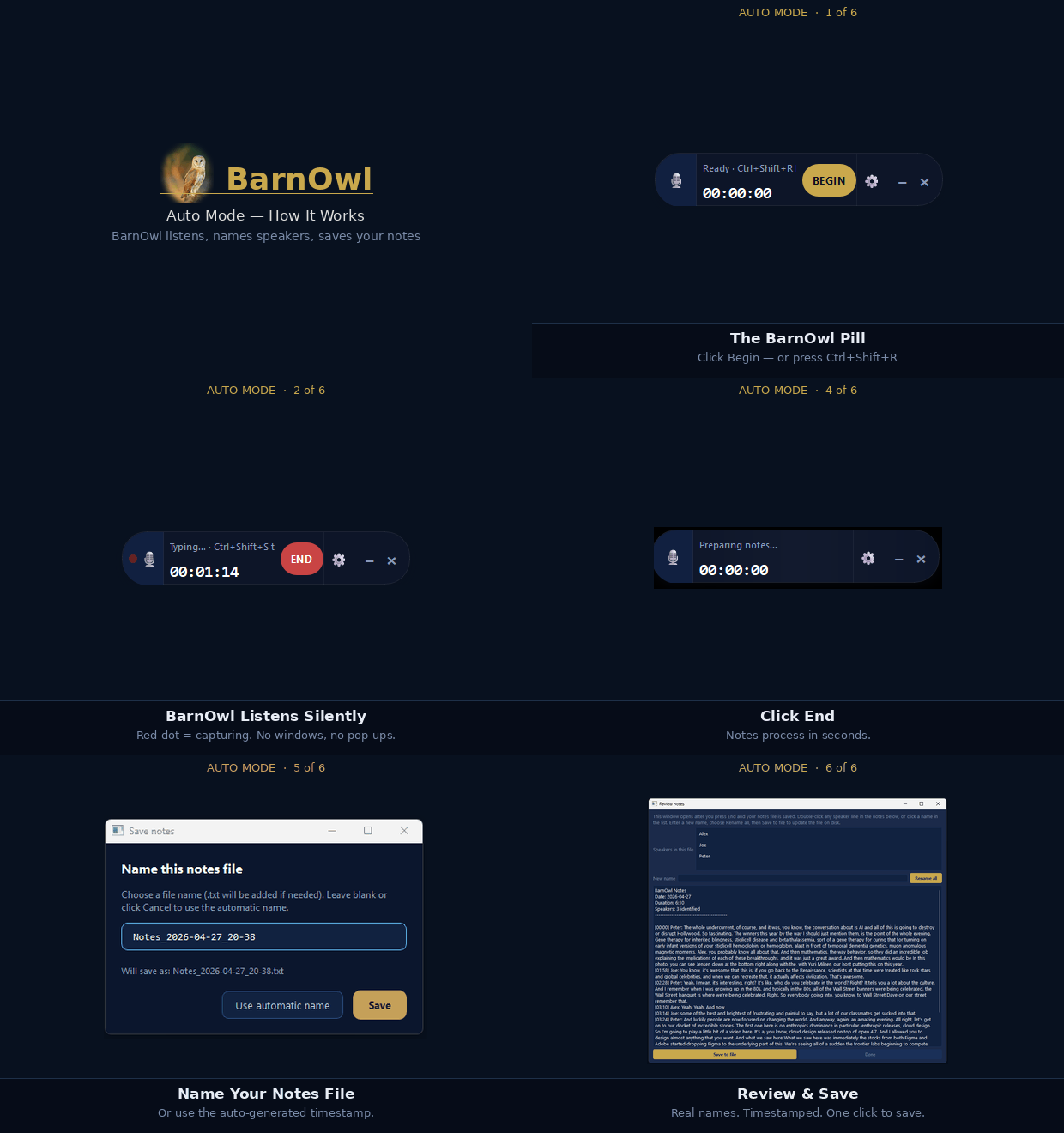
Auto Mode
Whisper automatically detects and labels each speaker
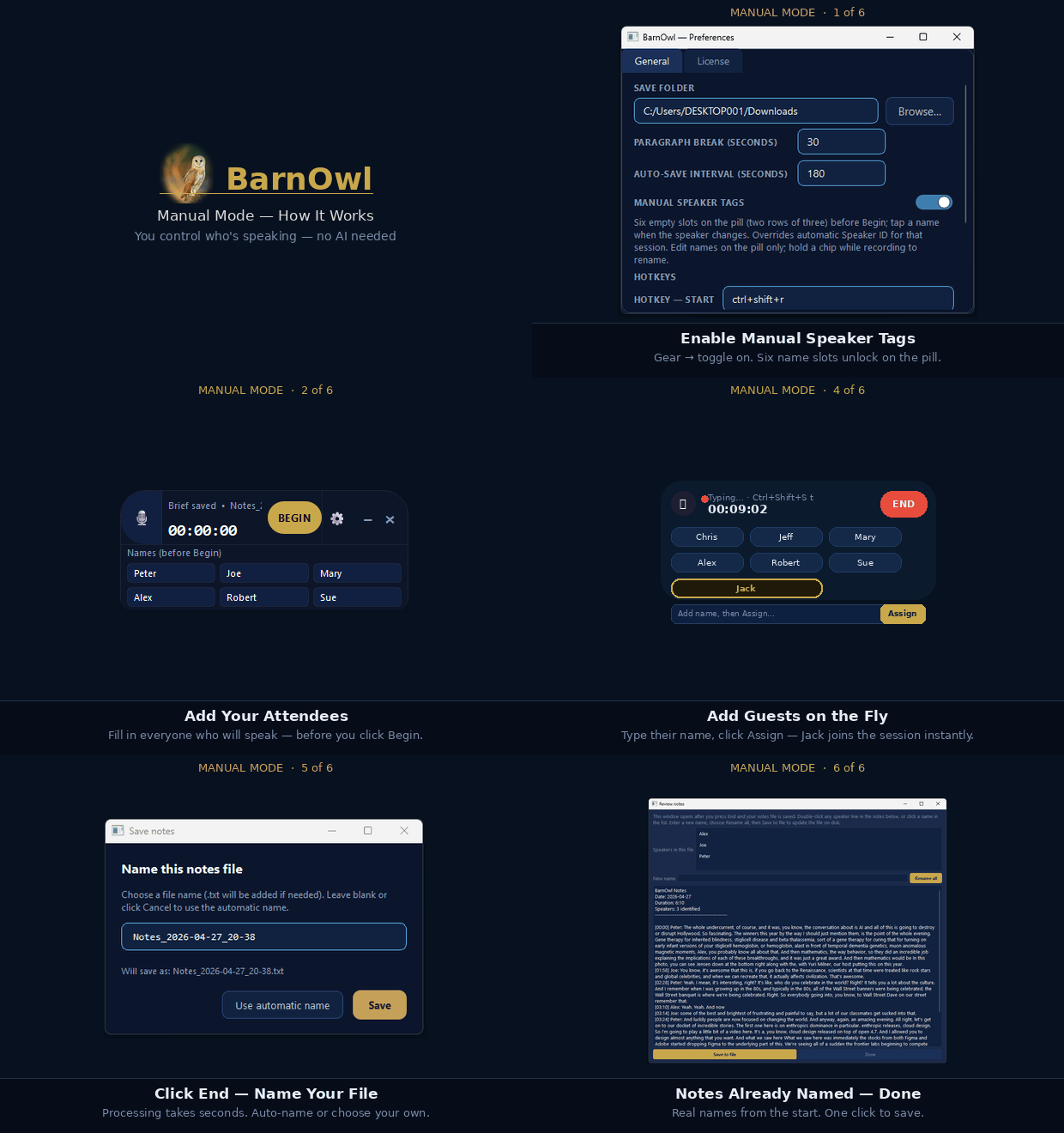
Manual Mode
You click to assign who's speaking as the meeting runs
No password. No recording. No cloud. Download free and have your first transcript in five minutes.
Download BarnOwl FreeWindows · Free · Local only